
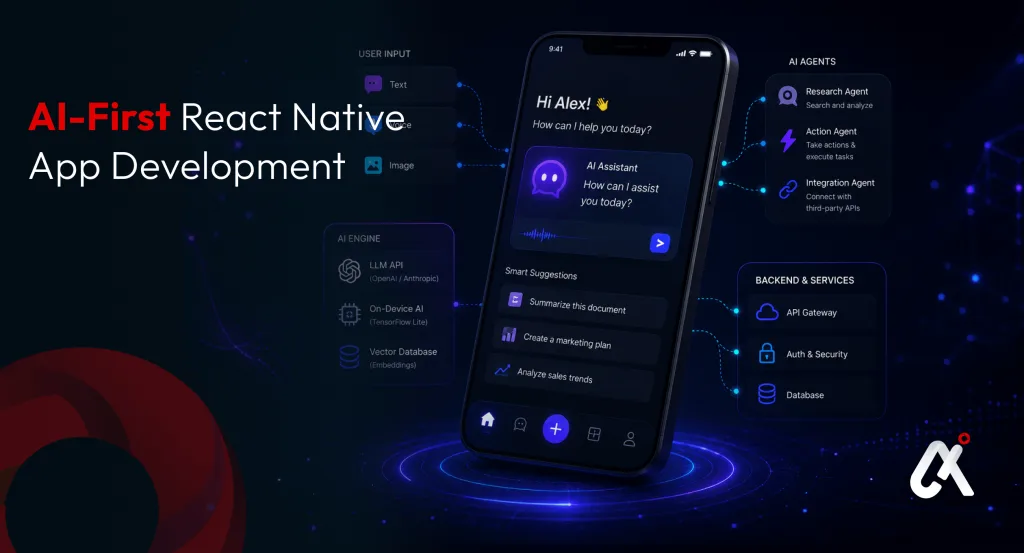
1. Introduction: React Native AI and the AI-First Era
In 2026, the paradigm has shifted entirely from “mobile-first” to “AI-first”. Users no longer expect apps to merely display information; they expect apps to reason, predict, and act autonomously. From intelligent healthcare trackers to hyper-personalized e-commerce engines, AI is the new baseline. React Native remains the undisputed champion of cross-platform development, offering the perfect bridge between native performance and rapid iteration. In this comprehensive guide, we will explore how you can leverage React Native to build a sophisticated AI-first mobile application that drives genuine business value.
2. What is an AI-First Mobile App?
An AI-first mobile app is an application designed from the ground up with Artificial Intelligence at its core, rather than treating AI as an afterthought or a supplementary feature. Unlike traditional apps that rely strictly on user inputs to execute deterministic tasks, an AI-first app uses Large Language Models (LLMs), machine learning, and contextual awareness to predict user needs, automate complex workflows, and provide conversational interfaces.
3. Why Use React Native for AI App Development in 2026?
React Native has continuously evolved to meet the demands of modern computing. Here is why it is the ideal framework for your next AI venture:
- Cross-Platform Efficiency: Write your AI integration logic once and deploy it across both iOS and Android platforms, drastically reducing time-to-market.
- Rich Ecosystem & AI Libraries: The React Native ecosystem now features robust libraries for edge AI, on-device machine learning (like TensorFlow Lite), and seamless REST/GraphQL API connections for cloud-based LLMs.
- Native-Like Performance: Thanks to the new React Native architecture (Fabric and TurboModules), passing heavy AI payloads between the JavaScript thread and native modules is faster than ever.
4. Core Architecture of an AI-Powered React Native App
To build a scalable AI app, your architecture must be decoupled, secure, and highly responsive. A typical tech stack includes:
- The Client (React Native UI): The interface where users interact, utilizing voice, text, or visual inputs.
- The Middleware/Backend: A secure layer (often Node.js or Python) that handles API keys, rate limiting, and prompt engineering before hitting the AI model.
- The AI Engine: Cloud-based APIs (OpenAI, Anthropic, or custom hosted models) or on-device local models for offline processing.
- AI Agents: Specialized micro-services that execute tasks and connect to third-party APIs to build autonomous workflows.
5. Step-by-Step Guide to Building Your AI App
Step 1: Ideation and Strategic AI Consulting
Before writing any code, identify the specific problem your AI will solve. Does your app need real-time NLP, image recognition, or predictive analytics? Partnering with experts for AI consulting ensures your technical roadmap aligns tightly with your business goals and compliance requirements.
Step 2: Designing the AI UX/UI
An AI app requires a different UX approach. Instead of static menus, incorporate dynamic chat interfaces, voice-to-text inputs, and contextual AI suggestions. The UI must elegantly handle latency (e.g., using streaming text effects or engaging loading states) while the AI processes complex data.
Step 3: Integrating LLMs and Backend Services
Use modern fetch mechanisms or Axios in React Native to connect your app to your backend. Avoid hardcoding API keys in the React Native code. Route all AI requests through a secure server to prevent quota abuse and prompt injection attacks.
Step 4: Implementing AI Agents for Actionable Intelligence
If your app needs to perform actions (like booking a flight or updating a CRM) based on chat input, you need AI Agents. Integrating AI agents elevates your app from a simple conversational chatbot to a functional digital assistant that executes tasks autonomously.
Step 5: Testing, Optimization, and Deployment
Testing AI apps involves more than checking for UI crashes. You must validate the AI’s responses for accuracy and guard against hallucinations. Optimize the payload size and cache frequent queries to ensure the app remains fast and responsive on mobile networks.
6. Frequently Asked Questions
Q: How much does it cost to build an AI-first React Native app in 2026?
The cost varies significantly based on complexity, ranging from $50,000 for a basic AI integration to $500,000+ for enterprise-grade, custom-trained AI solutions.
Q: Can React Native handle heavy machine learning tasks?
Yes. While React Native’s JavaScript thread isn’t meant for heavy computation, developers can use native modules to offload heavy ML tasks directly to the device’s GPU via TensorFlow Lite or CoreML, maintaining high performance.
Q: How do you secure data in an AI-powered mobile app?
Data security is maintained by encrypting payloads in transit, never storing sensitive API keys on the client-side, and ensuring that any PII (Personally Identifiable Information) is anonymized before being sent to cloud-based AI models.
7. Conclusion: Turn Your AI Vision into Reality
Building an AI-first mobile app in 2026 requires a deep understanding of both cutting-edge artificial intelligence and cross-platform mobile development. As user expectations continue to rise, businesses must adopt contextual, intelligent applications to stay competitive. At Aipxperts, we specialize in bridging this gap. From initial strategy to deployment, our end-to-end solutions guarantee measurable ROI.
Explore More from Aipxperts
- Mobile App Development — Full-stack mobile app development for iOS, Android, and cross-platform.
- Flutter App Development — Cross-platform mobile apps with a single codebase and native performance.
- AI Development Services — End-to-end AI product engineering from prototype to production.
- Generative AI Development — Custom GenAI applications including tutoring systems and content generation.
- LLM Development — Custom language models and RAG architectures for intelligent eLearning apps.
- Education & eLearning Expertise — Industry-specific AI solutions for K-12, corporate, and professional learning platforms.
- AI Consulting Services — Strategic consulting to define your EdTech AI roadmap before you build.